

Workspaces
Keep members, subscriptions, and usage separate in one SubLane instance.
A workspace is the boundary for one set of members and subscriptions. The workspace name appears beside the SubLane logo at the top of the left sidebar. Choose a different name there to change which workspace you are managing.
Accounts, account pools, member access, personal API keys, resource allowances, request history, usage, and audit records belong to the selected workspace. A user has one login and may belong to several workspaces with different roles.
Create the first workspace
On a new installation, setup has two steps: create the administrator login, then name the first workspace. Nothing is initialized until the second step is submitted. The administrator becomes that workspace's owner and is signed in.
A new workspace starts empty. To make it useful:
- In Accounts, connect and verify a subscription.
- In Account pools, create a pool and add the subscription.
- In Members, create people and use Pool access to grant each person the pools they may use.
- Members create their own keys under API keys. If needed, the administrator can add resource allowances to a dedicated pool.
You can follow the first-request guide for the initial account and key, then member access when you are ready to share.
Switch or add a workspace
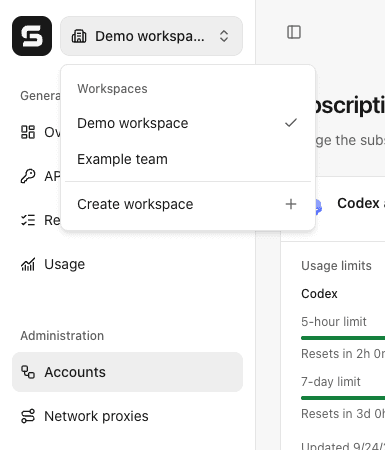
Open the switcher beside the SubLane logo. It lists the workspaces you can access, marks the current one, and includes Create workspace. Switching reloads private page data for the chosen workspace. Creating another workspace starts with an empty set of accounts, pools, members, and keys.
Each user can own up to ten workspaces, including the initial workspace when applicable. Creating an eleventh returns 409 workspace_limit_reached.
A key stays bound to the workspace and pool where it was created. Switching the browser workspace does not move that key or change where its requests are recorded. Create a new key for another workspace or pool.
Example workspace switcher with two sample workspaces:
Who can do what
| Role in this workspace | Access |
|---|---|
| Owner or administrator | Manage this workspace's members, accounts, pools, grants, allowances, usage, and audit. |
| Member | Manage their own keys and see their own requests, usage, and limits. |
Disabling someone's membership blocks their browser access and keys in this workspace. It does not disable their login or access to other workspaces. The first administrator also manages instance-wide Codex version settings and backups; other workspace administrators do not receive those platform controls.
What remains instance-wide
SubLane runs these workspaces in one Go process and SQLite database. A backup contains the whole instance, including every workspace and its encryption key; there is no single-workspace export or restore. Billing, PostgreSQL storage, and multiple application replicas are outside the current release.
Browser requests carry the selected workspace ID, but the server checks the session and membership on each protected request. Gateway requests identify their workspace from the personal key's saved binding; a browser selection header cannot move them. The gateway rechecks key, membership, pool, and model access on new requests and WebSocket turns.
Pre-release database change: new databases use the consolidated initialization schema, followed by additive migrations. Older development databases from before that schema are not upgraded automatically. Preserve the old data directory before starting this version with a fresh one.