

System settings
SubLane guide: system settings.
Use this when changing instance settings or investigating a Codex version compatibility problem. Defaults are sufficient to begin the setup guide.
The platform owner expands Administration → System settings in the sidebar, then selects Time zone (/admin/settings/timezone) or Codex client version (/admin/settings/codex). The previous /admin/settings address redirects to Codex settings. These settings apply to the whole instance; other workspace administrators and members cannot change them. The header's Preferences shortcut remains personal: theme, language and password.
Instance time zone
The default is UTC. Enter an IANA time zone such as Asia/Shanghai and save it to display timestamps in that zone across workspaces. Each resource allowance chooses a daily reset clock or a monthly date and clock in the selected zone. The default is midnight (the first day for monthly rules). The balance shows the exact next reset time; daylight saving changes are handled by the time zone rules. Minute request limits continue to use fixed sixty-second windows.
The change takes effect immediately. Existing allowance usage is counted from each request's start time within the newly selected window, so changing the zone does not silently clear current usage. Already scheduled allocation revisions keep their previously saved activation timestamp. Operational daily summaries and the hourly activity grid remain grouped by UTC; their UTC labels stay visible. The setting is stored in settings['instance.time_zone'] and audited with the change.
Codex client version
The effective version is chosen in this order:
- An explicit manual version, if configured.
- The last synchronized stable version, provided it is at least the built-in default.
- The built-in default (
0.155.1).
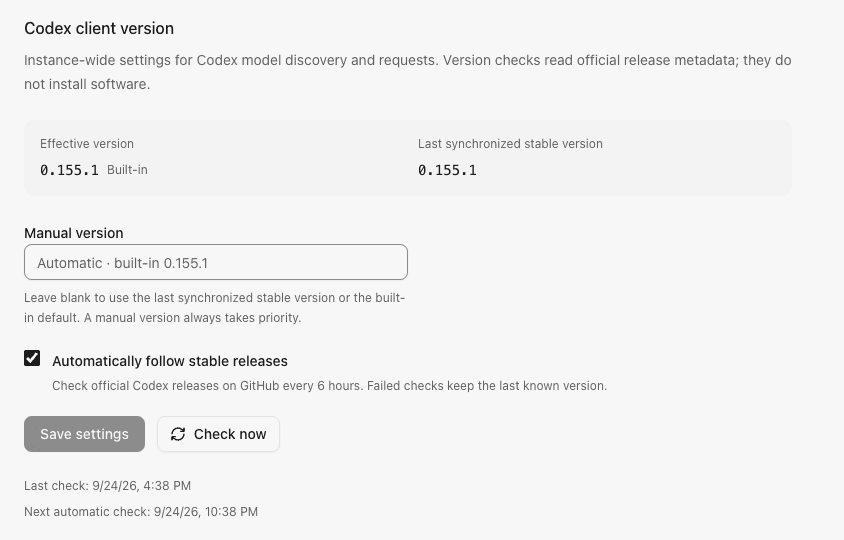
Manual versions use major.minor.patch without a v prefix or prerelease suffix. Clear the input to return to automatic selection. A manual pin may select an older version deliberately; automatic synchronization never lowers the remembered stable version or the built-in baseline. The page shows the effective version, its source, the last synchronized version, and check timestamps.
Automatically follow stable releases is enabled by default. At startup, the service checks if due and otherwise resumes the saved schedule. Successful checks schedule the next attempt six hours later. Failed checks preserve the previous successful version and retry after fifteen minutes, respecting longer upstream rate limits. Turning automatic checks off cancels pending automatic work and keeps the known version. It does not prevent an explicit Check now action or override a manual pin.
Manual checks share an in-flight operation and have a sixty-second cooldown after a completed attempt; upstream rate limits or a storage failure can extend it. Disconnected callers do not cancel shared checks. Shutdown cancels and joins all checks before SQLite closes.
The service reads only the official openai/codex GitHub release metadata. It accepts stable rust-v… tags and excludes drafts and prereleases. The latest-release endpoint has a 2 MiB response bound; if it points to another component, one fallback page is limited to thirty releases and 16 MiB, decoded one release at a time. Checks have a thirty-second deadline, reject redirects, and send no subscription credentials or GitHub token. Network failures, invalid responses and persistence failures retain the prior effective version. No binary is downloaded or installed, and the CLIProxyAPI dependency is unchanged.
Example Codex version settings with sample check times:
Persistence and request behavior
One bounded JSON value at settings['codex.version'] stores the configuration, last successful version and attempt timing. No new table or migration is required. Successful configuration changes and their settings.update audit event commit together. Automatic release observations do not create administrator audit events. The runtime version is published only after persistence succeeds.
Codex model discovery, quota metadata, and forwarding use the effective version. Each discovery request captures it once for the query, headers and persisted source marker. Changing the version invalidates catalog freshness: the next catalog read or model request triggers rediscovery. An in-flight result from a superseded version is discarded. Other providers and administrator model allowlists are unchanged. See model catalogs for stale-data and routing behavior.
Browser API
| Endpoint | Purpose |
|---|---|
GET /api/settings/timezone | Read the instance time zone |
PATCH /api/settings/timezone | Save time_zone as an IANA name |
GET /api/settings/codex | Read configuration, effective version and check state |
PATCH /api/settings/codex | Save both manual_version (string) and auto_sync (boolean) |
POST /api/settings/codex/sync | Check official releases with an empty JSON object |
All endpoints require the platform owner session. Mutations also require the exact origin. Invalid versions return 400; check cooldowns return 429 with Retry-After; release or persistence failures return sanitized 503 errors. A reported release version is compatibility metadata, not proof that every account supports every model in that release.