

Resource groups
SubLane guide: resource groups and direct member grants.
A resource group selects subscription accounts and API channels in one workspace. Create separate groups when members need different resources or models. Resources and groups never cross workspace boundaries.
Resource types and routing
Resource groups bind personal gateway keys, member grants and model policies. The editor selects subscription accounts and API channels separately; each resource kind has its own management page while retaining workspace isolation.
New UI groups prefer subscriptions with API fallback off. A mixed group uses API channels for new requests only when fallback is explicitly enabled and no eligible subscription is available. An API-only group uses its selected channels directly. Administrators may prefer API channels or retain client-protocol preference. API calls can consume upstream balance; SubLane does not query that balance.
Upgrades preserve existing groups' protocol preference and key bindings. Existing conversations never move to another resource after routing changes. Disabling fallback or removing/disabling a bound resource can fail its existing conversation rather than change its identity.
The management API keeps /api/groups and compatible account_ids payloads. The new UI sends resources (kind: "subscription" or "channel" and resource id) and routing (preference, allow_api_fallback). Mixed membership representations, duplicate IDs and incorrect resource kinds are rejected.
Administrator workflow
- In the selected workspace, open Resource groups and create a named group. Select subscription accounts and API channels separately. New resources remain unassigned until selected for a group.
- Open Members and grant each member access to the groups they may use. A grant applies directly to that member; there are no personnel teams. New members and new groups receive no automatic grants.
- Members create a personal key for an enabled group they can access. Each key is permanently bound to that workspace and group. Revoke and recreate a key to change its binding.
Unmanaged groups can share the same upstream account within one workspace. A resource allowance requires an exclusive group: remove its resources from other groups first. Once a group has an allowance, its resource membership stays fixed while the allowance exists, even if it is paused. Disabling a group or revoking a member grant blocks future requests and WebSocket turns without moving an existing conversation to another resource.
A workspace supports up to 32 groups and 100 resource associations per group. Groups can be renamed and disabled. The current interface does not delete groups. Member request limits and resource allowances are configured separately.
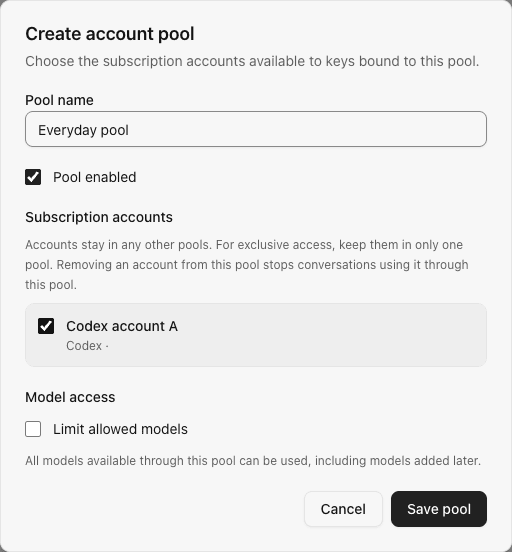
The following screenshot is from an earlier version with the account-pool labels; the current resource-group editor also lists API channels and routing preferences:
Request and conversation behavior
- Key creation checks current member and group access in the same transaction as the key insert.
- Each request and WebSocket turn rechecks workspace status, membership, key status, group access, and model policy.
- Discovery and inference use only eligible accounts in the bound group. A request can use an account only if its saved catalog supports the requested model.
- Conversation affinity is scoped to the member, group, and session. If its bound account becomes unavailable or leaves the group, the conversation fails rather than silently switching accounts.
- An already admitted request may finish after a grant changes; the next request or turn sees the new policy.
HTTP endpoints
Management endpoints require an administrator role in the selected workspace. Browser requests carry the workspace selection and require same-origin protection for mutations.
| Route | Purpose |
|---|---|
GET /api/groups / POST /api/groups | List or create groups in the selected workspace |
GET /api/groups/{id} / PATCH /api/groups/{id} | Read or update one owned group |
GET /api/groups/{id}/members | List directly granted, enabled members |
GET /api/groups/members/{userId} | List one member's group grants in this workspace |
PUT /api/groups/members/{userId} | Atomically replace that member's grants in this workspace |
GET /api/keys/groups | List groups currently available to the signed-in member |
The gateway identifies the workspace from the authenticated key, not the browser selection header. See workspaces and API keys.
Model access
An administrator can enable Limit allowed models in the group editor. Enter up to 100 exact IDs, one per line, using the IDs returned by /v1/models. Native IDs allow that exact model across supporting providers in the group. Existing provider-qualified rules retain their original provider scope; updating SubLane does not rewrite or broaden them. Legacy qualified rules can still be submitted explicitly. Wildcards are not supported, and model variants must be listed explicitly.
Groups remain unrestricted by default, including newly discovered models. Enabling the allowlist with no entries denies all models. The API accepts an optional model_policy: {"restricted": true, "models": ["synthetic-model"]} on create/update. Omission preserves an existing policy; it does not reset access. Group responses include restricted_models; detail responses also include allowed_models.
Model discovery filters out models outside the allowlist and does not contact providers excluded entirely by the policy. Responses, Chat Completions, compaction, and every WebSocket turn (including local prewarm) check current policy before account selection or upstream work. A denied model returns 403 model_not_allowed; it consumes no member rate/concurrency allowance and creates no affinity. Already admitted requests may finish.
Automatically discovered models
Open Models on a group to inspect the union of its eligible accounts’ saved model catalogs. The list follows account membership and applies the existing allowlist; it is not a second editable copy of that policy. New upstream models appear automatically only in unrestricted groups. Explicit restrictions, including an enabled empty deny-all list, remain unchanged by synchronization.
Inference uses account-specific catalog support before applying normal load/cooldown rules. Accounts with different subscription capabilities may share a group: a request is eligible only for accounts that reported its model. See model catalogs for freshness, failures and conversation affinity.