

Personal API keys
Create a personal key and connect your client; lifecycle and API details are reference material.
Start here if you already have a login and an authorized account pool. You do not need subscription credentials or knowledge of quota accounting.
Create and use a key
- Sign in and open API keys, then create a key.
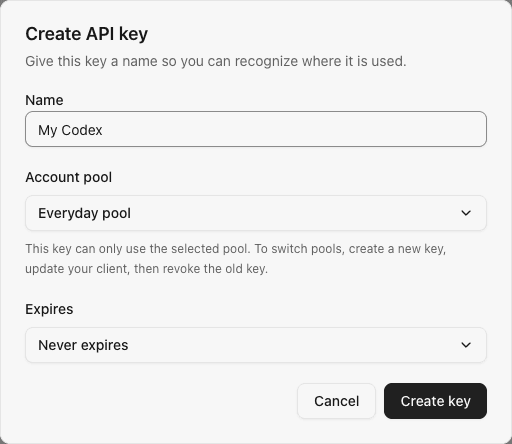
- Give it a recognizable name and select an authorized pool. Set an expiry only if needed.
- Copy the key and configure your client with it, the instance address and a model ID available in that pool. Codex users can follow client configuration.
- Send a message and confirm the result in Requests.
Finished: the client receives a response. Keep using this key; creating an allocation scheme is not required.
No pool to select? Ask the administrator to check your direct pool grant. Administrators setting up their first account should create a pool first.
The pool picker shows how many subscription accounts each pool contains. You can create a key for an empty pool in advance, but it cannot serve requests until an account is added; the form warns you before creation.
Next, see Everyday use. The sections below are for copying, changing, disabling or integrating keys when needed.
Example personal key form, without a real secret:
Ownership and lifecycle
- A user can have at most 20 non-revoked keys per workspace. The limit is checked transactionally.
- Lists are paginated in batches of 50, newest first. Each user sees, edits and revokes only their own keys, including administrators using the personal key endpoint.
- Keys default to enabled with no expiry. Set an expiry at creation, or edit the name, enablement and expiry later. The UI offers no expiry or 7/30/90 days, and preserves existing deadlines unless changed. Expiry is an absolute Unix timestamp (seconds); the key is invalid at that timestamp. The list displays status using the server clock.
- Pausing is reversible and preserves the secret and immutable pool binding. Paused and expired keys still count toward the 20 non-revoked-key limit. An expired key needs an extended/removed deadline before it can work again.
- Revocation is permanent. The same key is rejected by subsequent gateway requests.
- Disabling a membership blocks that member's keys in the workspace on their next gateway request or WebSocket turn. Their keys in other workspaces remain available. Re-enabling the membership restores enabled, unexpired, non-revoked keys; revoked keys stay invalid.
- Last-used time records successful key authentication, including requests that subsequently return an unavailable-provider response. Writes are throttled to once per minute per key. It is not a model-usage or billing counter.
Copying existing keys
Select Copy to retrieve your full key. Only its owner can do this, even if another user is an administrator. SubLane records the retrieval in the audit log without storing the secret there. If clipboard access fails, you can copy from a temporary dialog.
The browser does not save a copied secret in local storage or a web URL. Closing the dialog or switching identities discards its temporary value. The optional CC Switch import below passes the key to a local application link.
You can still copy a paused or expired key, but copying does not make it usable. Revocation permanently removes its recoverable value.
Optional: keys for a configured allowance
The key form lists pools available to you in the selected workspace. To use a resource allowance, choose the single Resource allowance: name · pool option. The form sends the allowance and its dedicated pool together; you do not need to select them separately. Keys for the same member and allowance share that allowance. Existing keys are not rebound automatically, and keys without an allowance cannot use its reserved pool. Create a new key when switching allowances.
Import into CC Switch
Install CC Switch on the computer running your browser. In API keys, choose the external-link icon on an active key:
- Choose Codex, OpenCode, Claude Code, OpenClaw, Hermes, Gemini CLI, or Grok Build. Review the configuration name, account pool and instance URL, then choose a model available to that pool.
- Select Prepare import to retrieve your key through the same audited endpoint used for copying.
- Select Open CC Switch, then review and confirm the configuration in that application. Enable it there when ready.
The import parameters follow CC Switch v3.20.4's provider deep-link contract. Install a CC Switch version that supports your selected client.
| Client | API base URL | Protocol |
|---|---|---|
| Codex, Grok Build | Instance origin + /v1 | Responses |
| OpenCode, OpenClaw, Hermes | Instance origin + /v1 | OpenAI-compatible Chat Completions |
| Claude Code | Instance origin | Claude Messages |
| Gemini CLI | Instance origin | Gemini generation |
Claude Code's default model and Haiku, Sonnet, and Opus aliases all map to the selected pool model. Gemini CLI uses API key authentication; SubLane does not expose Gemini token-count or native model-discovery endpoints, so verify your workflow after importing. Grok Build's imported context-window value comes from CC Switch; check it against the selected model. Selecting a client does not change which subscription providers are enabled.
The CC Switch import link carries the full key to the local application; it does not pass through a remote relay. CC Switch stores the imported key in its own configuration and does not switch to it automatically. For manual setup, see client configuration and client protocols.
The prepared link stays in the dialog and is discarded when you close or edit it. To change the client after preparing, select Edit configuration and prepare again. Only active, copyable keys with pool access can be imported. SubLane cannot tell whether CC Switch was installed or whether you confirmed the import there. For manual protocol examples, including Gemini, use Setup guide.
Connect Cline
Open API keys → Setup guide → Cline / OpenAI compatible. In Cline settings:
- Set API Provider to OpenAI Compatible.
- Enter the guide's API base URL, including
/v1. - Paste your personal SubLane key into API Key and set Model ID to a model available in the key's pool. Configure both Plan and Act if they use separate provider settings.
- Send a message and check Requests in SubLane. Set optional context-window and capability overrides to match the selected model.
The guide also provides a copyable Chat Completions request for testing with SUBLANE_API_KEY. Opening the guide or copying its example never retrieves your secret. Cline uses manual configuration here; it is not an entry in the CC Switch import menu.
Browser API
These routes require a valid enabled-user session cookie. Mutations retain the exact-origin, JSON-only, and body-size protections used by the rest of the browser API. The owner is taken from the session, never from a submitted user ID.
| Endpoint | Request | Response |
|---|---|---|
GET /api/keys?cursor=0 | Optional cursor | keys metadata, next_cursor and server_time |
POST /api/keys | name (1–64 characters), explicit group_id or resource scheme_id, and nullable expires_at | key metadata and secret |
GET /api/keys/{id}/models | No body | Authorized pool model catalog for an active, owned key |
POST /api/keys/{id}/secret | Empty JSON object | Full secret, for the owning user only |
PATCH /api/keys/{id} | All three fields: name, enabled, nullable expires_at | Updated metadata; never a secret |
POST /api/keys/{id}/revoke | Empty JSON object | Revoked key metadata |
Unknown or other-user key IDs return 404 api_key_not_found. Editing a revoked key returns 409 api_key_revoked. New or changed expiry values must be in the future; an unchanged past deadline can be retained while renaming an expired key. Omitting expiry on PATCH is rejected rather than silently removing a deadline. The non-revoked-key limit returns 409 api_key_limit. Key names cannot contain control characters.
Gateway authentication
Clients supply Authorization: Bearer <api-key> to /v1/*. Native /v1/messages additionally accepts x-api-key; Gemini /v1beta accepts x-goog-api-key, Bearer authentication, or a key query parameter. Conflicting credentials are rejected. See native client protocols. Browser session cookies alone do not authenticate gateway requests. Conversely, API keys cannot access /api/system, /api/members, or /api/keys.
Missing, invalid, paused, expired, revoked, or blocked keys return 401 invalid_api_key. A disabled user, disabled workspace or disabled membership blocks the affected key. Valid keys can discover models and forward Responses HTTP/SSE/WebSocket, compaction, and Chat Completions requests through configured subscription accounts. Every WebSocket turn rechecks the key, expiry, workspace, membership, pool access and model policy. In-flight admitted calls may finish after a change; new requests and turns must pass the current policy. Unknown gateway paths return JSON 404 responses after authentication. See Codex gateway for configuration, limits, and remaining live-client validation.
Use the backend origin in development, or Vite's /v1 proxy. The production binary serves the UI and gateway on the same origin. Use HTTPS for network deployments and avoid putting real keys into source control, shared logs, or shell history.
The consolidated initialization schema creates the key table and indexes. Manual changes appear in the workspace audit log.
Storage reference
Administrators and members open API keys in the General navigation group to manage their own gateway credentials. Each key has a name and a visible prefix. New keys can be copied immediately after creation or later using the copy icon beside their prefix. Metadata lists never return the secret, ciphertext or hash.
Keys use a sl_ prefix followed by 32 cryptographically random bytes encoded as unpadded base64url. SQLite stores a SHA-256 digest for authentication alongside owner ID, name, display prefix, lifecycle times, enablement and optional expiry. New keys also have an AES-256-GCM encrypted full value in api_keys.encrypted_secret, using the existing instance-local credentials.key. Ciphertext is bound to the API-key domain, owner and record ID, and decrypted values must match their authentication hash. Gateway requests continue using hashes; they do not decrypt secrets.
Back up credentials.key alongside SQLite, even when there are no upstream accounts. Startup rejects a missing or incorrect encryption key when recoverable gateway keys exist. This prerelease version does not migrate older development databases; initialize a fresh database and create new keys there.